New 1Tb M.2 SSD drive ordered for my Acer laptop.

DrNomis_44

Well-known member
Hey everyone,

Earlier this week, I ordered a new 1Tb M.2 SSD drive for my Acer laptop from an online company called mwave.com.au, I just got an email notification from them today, saying that my order had been dispatched, so hopefully next week it should arrive in the post.

I bought the new 1Tb M.2 SSD drive as an upgrade/replacement for the 256Gb M.2 SSD drive that came stock in my Acer laptop when I first bought it from my local Harvey Norman store, I need the extra storage space offered by the new 1Tb M.2 SSD drive so I can copy all my music in my desktop pc's music folder, onto my laptop.

Once I get the new 1Tb M.2 SSD drive in the post, I'll be documenting the installation of it in this thread for those who may be interested in seeing how to go about doing the upgrade.


Fun times ahead!!!!


1Tb is equal to about 1000 Gigabytes of data.
 
Last edited:
Definitely interested here, too. My Dell Inspiron all-in-one has a 1TB HDD. It's not particularly noisy - in fact, it's surprisingly quiet - but it is mechanical, and will eventually fail. Plus. SSD is just faster.
 
I'll be watching with interest to see how the Win 10 migration goes

It should be relatively painless, well at least that's what I'm anticipating anyway, since I'm going to be doing a complete clean-install of Windows 10 64 Bit build 2004, once the new 1Tb M.2 SSD drive is installed, but before I do that, I'm going to copy all my wanted data off the 256Gb M.2 SSD drive, onto an external HDD.
 
Definitely interested here, too. My Dell Inspiron all-in-one has a 1TB HDD. It's not particularly noisy - in fact, it's surprisingly quiet - but it is mechanical, and will eventually fail. Plus. SSD is just faster.


Going by my experience that I've had so far with SSD drives, they are practically dead-silent while they are operating, the only thing you'll need to watch out for is that your laptop's motherboard supports SSD drives and has an SSD drive socket on the motherboard.


And yes, SSD drives are a lot faster than mechanical drives, I've noticed that my laptop boots-up faster than my desktop pc, which has four 1Tb 2.5 inch Samsung SSD drives installed in it, but they are connected-up to the motherboard via Sata cables, there is an MSata socket on the motherboard though, I wonder if I can use the 256Gb M.2 SSD drive from my laptop in my desktop pc?
 
Last edited:
I just swapped my HDD for an SSD in my desktop today, and it's wild what a difference it made.

To be fair though, the old hard drive was ten years old and really struggling...
 
I just swapped my HDD for an SSD in my desktop today, and it's wild what a difference it made.

To be fair though, the old hard drive was ten years old and really struggling...


For sure, you'll also notice how much more reliable the SSD is compared to the old drive, being a device that uses Solid-State technology, an SSD drive doesn't suffer from the same mechanical wear and tear that a conventional HDD does, so it should last a very long time.
 
For sure, you'll also notice how much more reliable the SSD is compared to the old drive, being a device that uses Solid-State technology, an SSD drive doesn't suffer from the same mechanical wear and tear that a conventional HDD does, so it should last a very long time.

I've heard this. Also it's so quiet! And small and light (not that I ever have to move the desktop tower, but still)

It was an investment I should have made two months ago before the work from home saga began
 
I've heard this. Also it's so quiet! And small and light (not that I ever have to move the desktop tower, but still)

It was an investment I should have made two months ago before the work from home saga began

When the first SSDs became available, I was a bit skeptical about them having heard that they had a limited number of read/write cycles before they failed, the later-generation SSDs seem to be much better in that regard, soon as I could afford them I decided to switch over to using them after having too many mechanical HDDs go faulty, I lost heaps of wanted data after a 4Tb Sata HDD failed, that's what finally made me decide to switch over to SSDs.
 
My current PC setup has a SSD as the boot drive containing all the OS stuff and installed programs. I have a couple of larger capacity spinning disks mounted as well, primarily containing my media library, ebooks, games archive etc. All the stuff that would fill the SSD. My home PC doubles as the home media server running Plex. I also have nightly backups that sync all key files to an external USB, and monthly backups that sync the first external USB drive to a second one. The second drive normally lives at work but it's at home too right now.

While this sounds complicated, it means I rarely lose anything by accident. I can still pull up files from 20 years ago if I want them.
 
Do you mean different hard drive locations? Or different physical locations? I agree with the need for both. Having 4 copies on different drives all at home doesn't help if my home burns down, falls over and then sinks into the mud. But it does protect against the more common drive failures. For physical locations, my drive stored at work and updated monthly helps somewhat. Critical stuff is also stored offsite.
 
Update:

I've just checked the postal tracking for the parcel containing the new 1Tb M.2 SSD drive I ordered, and apparently it is due for delivery today, I've already confirmed my availability for delivery and now it's just a waiting-game, feeling pretty excited about this.
 
I just hope that it is compatible with my laptop's motherboard.

I think you'll probably find that they are.

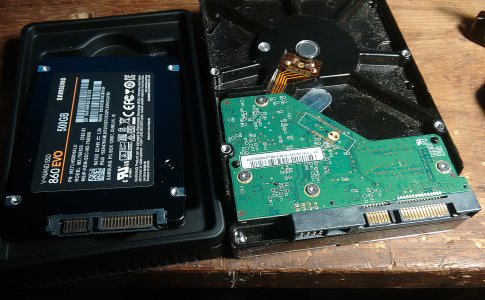
FWIW I've just got a Samsung EVO 500GB to replace the drive in my Lenovo E530.
Whilst investigating whether I may need an adapter, found that the connection is identical to other drives.

I have a portable powered caddy that I use to access data directly from HDD's external to the PC.
comparison.jpg
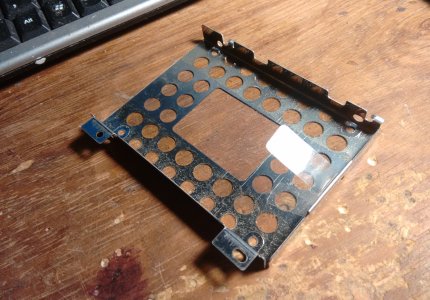
Laptop has a bracket that they screw into.
comparison (2).jpg

For me the test comes into play when I attempt to 'migrate' the same version of Windows 10 onto the new drive.

cheers, Mark.
 
I think you'll probably find that they are.

FWIW I've just got a Samsung EVO 500GB to replace the drive in my Lenovo E530.
Whilst investigating whether I may need an adapter, found that the connection is identical to other drives.

I have a portable powered caddy that I use to access data directly from HDD's external to the PC.
View attachment 36158
Laptop has a bracket that they screw into.
View attachment 36159

For me the test comes into play when I attempt to 'migrate' the same version of Windows 10 onto the new drive.

cheers, Mark.

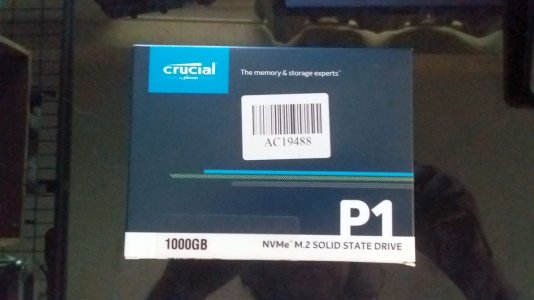
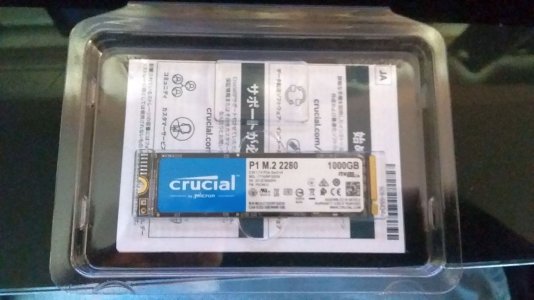
The 1Tb M.2 SSD I'm getting is a smaller type, one of these:

https://www.mwave.com.au/product/crucial-p1-1tb-nvme-m2-pcie-3d-nand-ssd-ct1000p1ssd8-ac19488


My studio desktop pc has four of these installed in it now:

https://www.mwave.com.au/product/sa...ii-6gbs-4bit-mlc-vnand-ssd-mz76q1t0bw-ac20878
 
Last edited:
Woohoo!!!!....the parcel containing the new 1Tb M.2 SSD drive just arrived in the post.

1TB_M_2_SSD_1_resized.jpg

1Tb_M_2_SSD_2_resized.jpg


Ok, next step is to do all my backing-up of all my wanted data that's on my laptop's stock 256Gb M.2 SSD drive prior to installing the new 1Tb M.2 SSD drive.


Backing-up done....time to install the new 1Tb M.2 SSD drive in my Acer laptop, then it's on to doing a complete new clean install of Windows 10 64 Bit build 2004, and then I can get all my Daw software installed.

New 1Tb M.2 SSD drive is now installed, I've just finished installing a fresh new copy of Windows 10 64 Bit build 2004 on my Acer laptop, everything went smoothly, initially the new SSD drive wasn't coming up in my laptop's bios screen, that's because it was un-formatted, however, the Windows 10 64 bit installer DVD that I used, saw that the new SSD was installed....which was a very good sign, it came up as a 931Gb drive, I'm very pleased with that, boot-up is very fast too.


So far, practically zero issues.

I've got some pics to post in this thread later on....stay tuned.
 
Last edited:
The Win 10 installer DVD is a matter of interest to me, my desktop pc was an online upgrade from Win 8.1 and my laptop from Win 7 so there are no install disks or serial numbers to work with, does a recovery disk resolve this issue.

Apparently the "free" upgrade is linked to the mac address or some other hard coded id of the motherboard and primary HD.

Swapping out the C drive for any reason scares the hell out of me for this reason
 
Back
Top